
Record your screen. Post it everywhere in one click.
Motion Casts is a screen recorder and video editor for Windows. Capture your screen, a window, a region or a browser tab with your webcam and voice, tidy it up with on-device captions, silence removal and smart zooms, then export perfectly sized versions for YouTube, TikTok, Instagram and more - all in one pass.
Everything you need to make great tutorials - and post them everywhere.
Most screen recorders stop when you press Stop. Motion Casts carries on until your video is captioned, trimmed and ready for every platform.
Record exactly what you need
Screen, window, region or browser tab
Record a full screen, one or all monitors, a single window, a region you draw or just the page area of a browser tab, at up to 4K and 60 frames per second. GPU encoding keeps it smooth, with a countdown, pause and resume, and global hotkeys that work in any program.
Webcam, microphone and system sound
Add your webcam as a circle or box in any corner, with background blur. Microphone and system sound are recorded on separate tracks, with noise reduction, so you can balance them later.
Clicks, keystrokes and drawing
Highlight the cursor, show click ripples and display keystrokes (or shortcuts only, for privacy). Draw arrows, boxes, pen and highlighter marks and notes on screen while you record.
Teleprompter, scheduling and live streaming
Read your script from a teleprompter that is hidden from the recording, with speed and size controls or "follow my voice". Schedule recordings once, daily or on weekdays, and stream live over RTMP to YouTube, Twitch, Facebook or a custom server while keeping a local copy.
Edit in minutes, not hours
Cut pauses, filler words and mistakes
A timeline with the waveform, captions and markers makes editing quick: split, trim, delete a range, change speed from 0.5x to 4x, join and reorder clips, and undo anything. One click finds long pauses and filler words, and you review each cut before it is made.
Auto captions, made on your PC
Captions are generated from your voice on your own computer in 18 languages - your audio never leaves it. Edit and style them, choose standard or bold word-by-word, then burn them in or save SRT and VTT files.
Zooms, privacy blur and branding
Auto zoom follows your clicks and typing, with manual zooms too. Blur or pixelate private details with an area that tracks, and add text, arrows, your logo, music, intro and outro templates and chapters.
Export once, post everywhere
Every platform, rendered in one pass
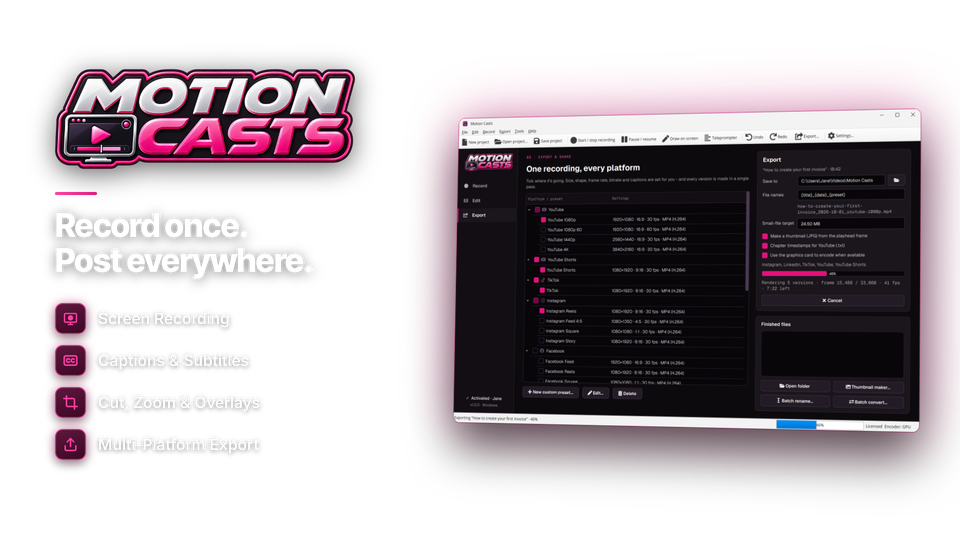
Tick YouTube, Shorts, TikTok, Instagram, Facebook, X, LinkedIn, Twitch or Vimeo and every version is rendered in one pass with the right size, frame rate and bitrate. Save MP4 (H.264 or H.265), MOV, MKV, WebM, AVI, animated GIF, MP3 or WAV, or build your own presets.
Vertical reframe, target size, thumbnails and chapters
Auto reframe turns a widescreen recording into 9:16 that follows your cursor and clicks, with a manual shift if you need it. Set a target file size and Motion Casts finds the best quality that fits. Make a thumbnail, add chapter markers with a YouTube timestamp list, and name files automatically - or batch rename and convert older videos.
Optimized for every place you post.
Pick the platforms and Motion Casts sets the size, aspect ratio, frame rate and bitrate for each one.
| Preset | Shape | Typical settings |
|---|---|---|
| YouTube | 16:9 | 1080p, 1080p 60, 1440p or 4K |
| YouTube Shorts | 9:16 | Vertical 1080 × 1920, auto reframe |
| TikTok | 9:16 | Vertical 1080 × 1920, burned-in captions |
| 9:16 · 4:5 · 1:1 | Reels, Story, Feed and Square | |
| 16:9 · 1:1 | Feed video | |
| X (Twitter) · LinkedIn | 16:9 · 1:1 | Posts within each platform's limits |
| Twitch · Vimeo | 16:9 | High-bitrate uploads; live streaming over RTMP |
| Email & chat | any | Target file size, GIF or MP3 |
| Custom | your own | Format, size, fps, bitrate and size limit |
From idea to posted video in four steps.
Record once, and let Motion Casts do the tidying and the exporting.
Record
Screen, webcam and voice.
webcam on
Clean up
Cut pauses and filler words.
saved 1:54
Caption & polish
Captions, zooms and branding.
zooms auto
Export
Every platform at once.
no watermark

For anyone who explains things on screen.
One recording, a week of posts
A full YouTube tutorial plus vertical clips for Shorts, Reels and TikTok - captioned and exported together.
Lessons people can follow
Click effects, key display, zooms and captions make every step easy to see - even on a phone.
Demos and how-tos in minutes
Product demos, onboarding videos and support answers, with private details blurred and your logo on every video.
One license. Every feature. Yours to keep.
No subscription, no watermark and no recording limits. Recording, editing, captions and every export preset are included, with free updates.
- Recording lengthno limit
- Watermarknone
- Works onWindows 10 & 11 (64-bit)
- Updatesfree
- Activations1 PC
- Deliverydownload + key by email
Checkout
You'll go straight to your download page once payment is confirmed, and we'll email your download link and license key.
Already bought? Get your download link again.
Screen recording questions, answered.
What can Motion Casts record?
Your full screen, one or all monitors, a single window, a region you draw or a browser tab - with your webcam, microphone and system audio, in up to 4K at 60 frames per second.
Can I export straight for YouTube, TikTok or Instagram?
Yes. Pick a platform preset and Motion Casts sets the size, aspect ratio, frame rate and bitrate for you. Tick several platforms and every version is rendered in one pass.
Can it turn a widescreen recording into a vertical video?
Yes. Auto reframe follows your cursor and clicks to make a 9:16 version for Shorts, Reels and TikTok, and you can shift the framing by hand.
Does it add captions?
Yes. Captions are made on your own PC from your voice in 18 languages, so your audio never leaves your computer. Edit and style them, then burn them in or save SRT or VTT files.
Can it cut out my pauses and mistakes?
Yes. One click finds long pauses and filler words, and you review each cut before it is made. You can also trim, split, delete ranges and change speed on the timeline.
Can I show clicks, keystrokes and draw on screen?
Yes. Highlight the cursor, show click ripples and keystrokes, and draw arrows, boxes and notes on screen while you record. A teleprompter that stays out of the recording is built in.
Which video formats can I save?
MP4 (H.264 or H.265), MOV, MKV, WebM, AVI and animated GIF, plus MP3 or WAV audio. You can also create your own presets with any size, frame rate and bitrate.
Can I make a video smaller to email or upload?
Yes. Set a target file size and Motion Casts finds the best quality that fits.
Can I live stream?
Yes. Stream over RTMP to YouTube, Twitch, Facebook or a custom server while keeping a local recording.
Is there a watermark or time limit?
No. There is no watermark and no recording time limit. You can open every page, setting and preset before activating; recording, editing and exporting unlock with your installation key.
Which versions of Windows are supported?
Motion Casts runs on 64-bit Windows 10 (version 1809 or later) and Windows 11.
Is it a subscription?
No. It is a one-time payment of $59.95 with free updates.
How do I get the software after paying?
You go straight to your download page once payment is confirmed, and your download link and installation key are emailed to you. In Motion Casts, choose Settings > Enter Installation Key and click Activate.
Record once. Post everywhere.
Record, caption and export for every platform on your own PC. One license, no subscription.
Get Motion Casts · $59.95